
Approved steps in the right work context
Digital Work Instructions: Guiding Work Steps in Context
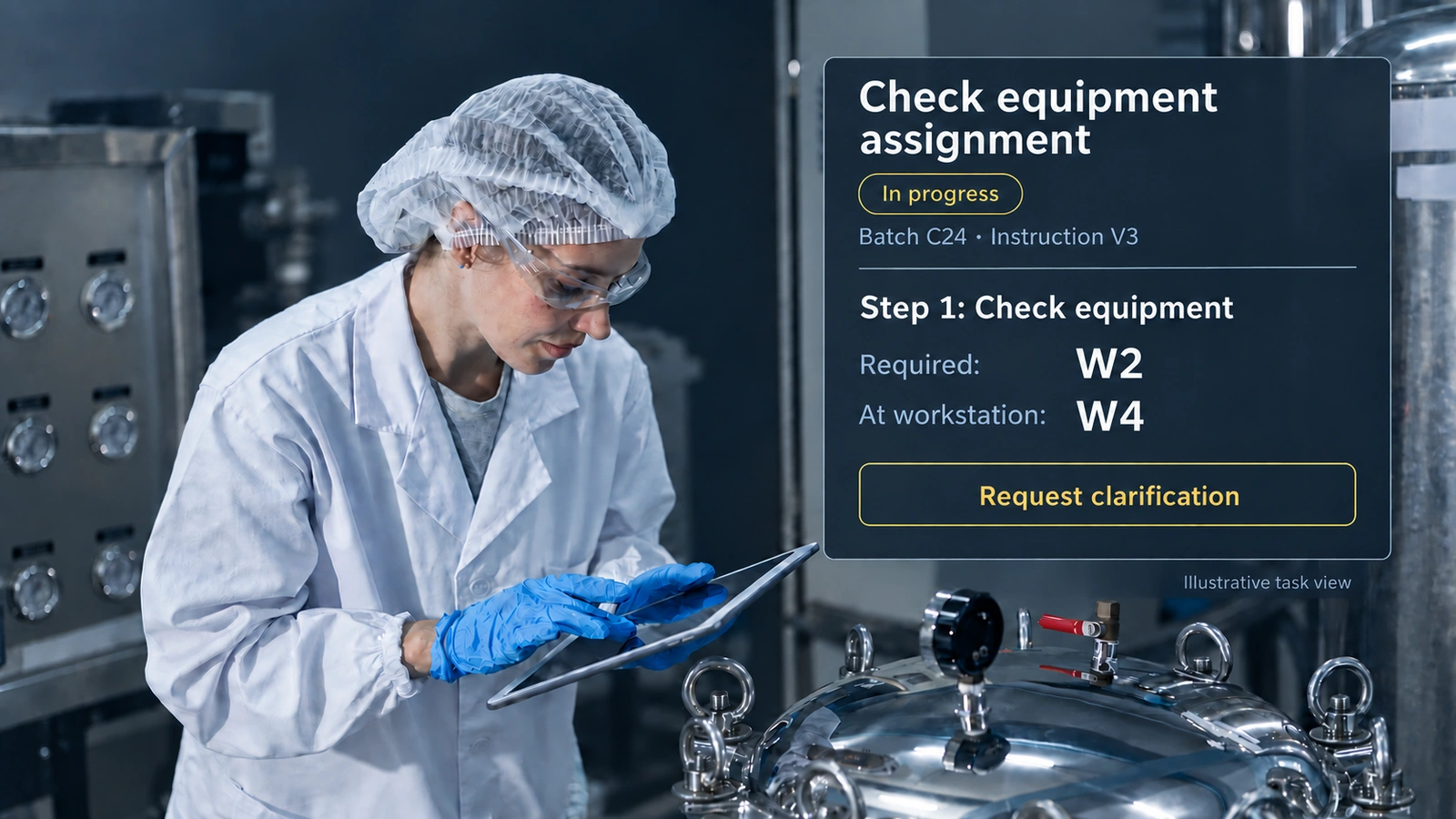
The task shows scale W2, but W4 is at the workstation. How can the operator clarify the assignment before confirming a result?
Brief definition: A digital work instruction provides the requirements for an activity electronically, for example as a document or an interactive guide. Interactive versions can take account of the work context and capture results directly.
What is a digital work instruction?
A PDF file can also be a digital work instruction. The focus here goes further: the instruction is connected to the specific task and the inputs and results produced during its execution. Which form is appropriate depends on the activity and the controls required.
Whether a digital work instruction is the right first step depends on the observed problem. When selecting a first production digitization use case, distinguish what is missing: valid instructions at the workstation, machine-state data, or the connection between execution, inspection, and the decision?
A digital work instruction can, for example, identify the batch, equipment, product variant, or role for which a task is performed. It can reuse existing data, request required information, and allow a checkpoint to be completed only when the specified information is available. Which controls are actually useful and permissible depends on the process, its risk, and the applicable requirements.
Example: The scale does not match the displayed task
An illustrative workplace scenario: before the dry weight is recorded, the task displays batch C24, weighing requirement V3, and scale W2. However, W4 is at the workstation. Noticing this difference at all presupposes equipment labelling that identifies the individual device, not just the device type. The operator notices the difference before taking the measurement and submits the equipment assignment for clarification rather than simply confirming the prefilled value. For automatically received device values, the IoT gateway setup also needs to specify which source and time belong to the active step.
After the required review, the appropriate assignment is used. The interface shows the requirement that actually applies and records the new weight with its unit. A reused equipment identifier and a newly recorded measurement remain distinguishable as different pieces of information.
Completion can trigger result review, a transaction, and a status change together, provided their prerequisites are met. The completion button replaces neither the measurement nor a required decision. A mandatory field alone does not establish whether someone actually performed the physical activity.
For Human in the Loop to be effective at this workstation, the person must be able to identify the valid version and equipment assignment and actually obtain clarification. The work instruction supports this review by making the necessary information and clarification path accessible.
The presentation must fit the actual work
Whether a tablet, smartphone, fixed terminal, or smart glasses are suitable depends on the environment and activity. Gloves, lighting, noise, hygiene, network coverage, and having hands free affect usability. An interface that looks convincing on an office screen may be unusable at a machine.
With industrial smart glasses, interaction must also work when both hands are needed for the task; the display alone does not meet this requirement.
Information should be specific to the step, clear, and accessible without unnecessary navigation. Critical information must be recognizable without making every page look like a warning. Images or spatial markers help only if they clearly explain the specific object.
In a case study involving ten experienced metalworkers, Eversberg and Lambrecht compared an assistance system with a 27-inch touchscreen and a separate 43-inch monitor for screen-based AR with the established paper-based repair process. All participants preferred the assistance system. Mean task completion time was lower, but the time difference was not statistically significant (p = 0.054). The lower subjective workload was statistically significant (p = 0.012).[1] The study evaluates this specific workstation and does not support a general claim that digital work instructions are superior or that smartglasses improve performance.
Eversberg & Lambrecht 2023 · n = 10 experienced metalworkers
Digital work instructions: lower completion time and lower perceived workload
The design must therefore be tested with the actual users and working conditions. Good guidance reduces searching and manual transfer of information. Poor guidance creates additional confirmations, obscures the overall context, or devalues practical experience.
The work context determines what is displayed
The same activity may require different information depending on the product, material, equipment, or process state. For a human-centered implementation in the sense of Industry 5.0, the person carrying out the task needs to understand those distinctions at the workstation. A cleaning instruction may contain different checkpoints if an allergenic material, an active substance, or a particular cleaning agent was used previously. Sampling may depend on batch status, sample type, and the intended laboratory.
Context-specific guidance therefore does not mean creating an entirely new document for every variant. An approved basic procedure can contain controlled variants. The system selects them using explicitly modeled conditions and shows the person why an additional step or a different requirement applies.
Operational knowledge models provide concepts, relationships, rules, and validity conditions for this purpose. They can describe that a particular limit applies only to one product, process phase, and SOP version. The work instruction makes this knowledge usable at the specific point of work.
Automatically reused context reduces repeated input but must not remain invisible. The operator should be able to identify the batch, version, equipment, or role the system is using. If the context is incorrect or incomplete, controlled correction or clarification must be possible.
Choose document display or interactive guidance according to purpose
An approved PDF can be a suitable digital work instruction. If measurements are recorded separately, the person must be able to establish the connection between the requirement and the record. An interactive sequence can provide this connection directly within the task, but needs appropriate inputs and a way to handle exceptions.
EU-GMP Chapter 4 distinguishes instructions from records and permits different media forms.[[2]] For the workplace scenario considered here, two questions must therefore be answered separately: Which requirement applies, and which information was actually recorded while carrying it out?
The presentation format should be chosen according to the work process. An interactive screen offers no advantage if it conceals the equipment mismatch or can only be exited through a false confirmation.
Components of a reliable digital work instruction
A practical interactive implementation needs more than a sequence of text pages. Five components should be clearly distinguishable:
Approved content, an unambiguous version, and a defined scope.
Task, object, batch, location, equipment, role, and current process state.
Understandable actions in a sequence defined by the work requirements.
Measurements, quantities, confirmations, decisions, and required controls.
A traceable state change, follow-up task, or documented deviation.
This structure must not become a sequence of clicks without substantive meaning. A field is useful only when the actual observation or action it documents is clear. A confirmation such as “done” is insufficient when the process actually requires a quantity, measurement, material used, or justified decision.
PIC/S makes a useful design point in its guidance for paper records in GMP/GDP environments: fields should make clear what needs to be entered, and their order should follow the operation and its SOP to reduce omissions.[3] Applied to an interactive work instruction, this means asking for the equipment assignment before the measurement and placing the value and unit together. This is a design inference, not a PIC/S requirement to use digital instructions.
Workflow models describe the intended process structure of tasks, transitions, and decision points. The digital work instruction translates this structure into the specific interaction and work situation. It does not display the entire process diagram but guides the person through the relevant part.
Approval, validity, and versions
A digital work instruction needs a clearly defined lifecycle. Drafting, review, approval, effective date, change, and withdrawal must be distinguishable. Only a version that is approved and valid for the operation may govern actual execution.
For documents containing instructions, EU-GMP Chapter 4 requires, among other things, approval, signature, and date by authorized persons, clear identifiability, and a defined effective date. Instructions should be orderly, easy to review, and written in language appropriate to their intended use; quality management system documents should be reviewed regularly and kept up to date.[2]
For technical implementation, this does not mean that every industry needs the same approval process. Rather, the general architectural principle is that the version used must be unambiguous at the time of execution. If an instruction changes later, a historical task must not subsequently appear to have been carried out under the new version.
Versioning also applies to embedded elements. If a limit, image, or review question is reused centrally, it must remain possible to trace which version was displayed during the specific execution. Otherwise, the main document may have a version number while its actual content changes unnoticed.
Documentation is created during execution
The greatest structural difference from a static instruction is the direct connection between guidance and recording. A work step can initiate a physical action and capture the associated data at that very point. The person does not have to transfer the result from memory later. For subsequent batch traceability, the material batch actually used must be captured; the batch planned in the instruction alone does not establish its use.
MHRA section 5.1 links reliable recording to workplace conditions: records must be accessible where the activity takes place, with sufficient time, space, and functioning equipment for the task and its documentation.[4] For the workstation described here, the recording interface must therefore be usable at the scale, including with gloves. A terminal that can only be reached after leaving the work area would encourage temporary notes and later transcription.
EU-GMP Chapter 4 provides for records to be made or completed at the time of each action and for significant manufacturing activities to remain traceable. For batch records, it specifies, among other things, times, operators and reviewers, material batches and quantities used, relevant operations, in-process controls, results, and approved deviations.[2]
Information created during execution can already support later automated compliance evidence when its context is preserved.
For a complete batch-specific record, those execution-time details are consolidated in the Electronic Batch Record.
A digital work instruction can prepare this recording close to the process:
- Known information is reused from the task and process object.
- New measurements are recorded with their units and measurement context.
- Material consumption is assigned to the activity performed.
- Review and approval can only be carried out by people with the respective permission.
- Completion creates a substantive process event or a new state.
A “Complete task” button can trigger result review, a transaction, and a status change together. What matters is that the required results are available and the specified checks are satisfied. A mere status change must not replace missing measurements, quantities, or decisions. This requires clearly defined substantive conditions, not separate buttons.
The resulting data need the same care as other electronic records. For computerized systems, Annex 11 requires a risk-based lifecycle, defined responsibilities, validation, and controls for secure data input and processing. It also makes clear that replacing a manual operation should not reduce product quality, process control, or quality assurance, or increase overall risk.[5]
For computerized entry in GMP/GDP environments, PIC/S section 9.7 calls for software-controlled data formats and verification of manually entered critical data by a second operator or validated computerized means.[3] A required numeric field alone does not establish that a weight is correct: the check must address the relevant error risk, such as an incorrect unit or equipment assignment. Which checks are needed must be defined for the particular measurement step.
Deviations must not disappear from the process
Guided steps should simplify routine work. However, they must not be so rigid that actual deviations can only be handled through false confirmations or by bypassing the system. A process must be able to handle unplanned observations, missing materials, unsuitable equipment, or unmet prerequisites.
A reliable work instruction provides controlled paths for these situations. The person can pause a step, record a deviation, involve a responsible role, or initiate rework. The reason, time, and affected objects remain connected to the operation. The system should not pretend that every exception is fully foreseeable.
Corrections are also part of execution. If a measurement is entered incorrectly, the original entry should not be overwritten unnoticed. The correction, reason, and responsible person must remain identifiable in the process history. Data integrity requirements therefore apply not only to the later archive but also to the input interface and error handling.
What digital work instructions do not automatically accomplish
- Digitization does not make a poor instruction correct. Unclear or substantively incorrect requirements remain problematic on a tablet.
- An interface does not replace qualification. Experience, training, and substantive responsibility remain necessary.
- A single case does not prove a general productivity gain. Benefits and risks must be assessed in the actual process.
When implementing Workflow Software, staff should practice the intended process at the actual workstation and rehearse interruptions as well.
The interface must be tested under actual working conditions; a formally complete sequence of steps is not enough on its own.
The equipment mismatch must be noticeable before confirmation
W2 in the task and W4 at the workstation are not, in this example, a detail that an additional completion confirmation would resolve. The person must be able to see the difference and clarify the assignment.
A useful digital work instruction makes the applicable requirement executable and keeps new results connected to it. Whether this succeeds becomes apparent during the actual activity, including gloves, interruptions, and inappropriate prefilled information.
Primary sources and further reading
- [1] · Journal article Evaluating Digital Work Instructions with Augmented Reality versus Paper-based Documents for Manual, Object-Specific Repair Tasks in a Case Study with Experienced Workers Original paper ↑ back to text
- [2] · Guideline EudraLex Volume 4, Part I, Chapter 4: Documentation Original document ↑ back to text
- [3] · Guideline Good Practices for Data Management and Integrity in Regulated GMP/GDP Environments Original document ↑ back to text
- [4] · Guideline GxP Data Integrity Guidance and Definitions Official guidance ↑ back to text
- [5] · Guideline EudraLex Volume 4, Annex 11: Computerised Systems Original document ↑ back to text
- Further reading · Authority Industry 5.0 – Towards a sustainable, human-centric and resilient European industry Original document