
From the scanned code to the correct assignment
Equipment labelling: Using QR codes and Data Matrix codes to access the right process context
QR codes and Data Matrix codes can connect devices to information and process context. Both store data in a two-dimensional pattern of light and dark modules; on a device, they can carry an identifier or a web address.
A suitable reader decodes the content; the application establishes the connection to information or a workflow. Whether this leads to a device type, an individual device or merely a portal’s home page depends on the content and how it is processed; whether the result matches the current work step remains a question for the application.[1][2][4]
What the code on a device identifies
A QR code or Data Matrix code can carry an internal operational identifier. What matters is what it refers to: a type identifier denotes a device type, while an individual-device identifier denotes a particular instance. For materials, a corresponding distinction is needed between material type, batch and individual container. In GS1 DataMatrix, the content follows the rules of the GS1 system; here too, the application must evaluate the data structure to recognise the level of identification.[1][2]
GS1 provides the Global Individual Asset Identifier (GIAI) for individual assets. For returnable assets, the Global Returnable Asset Identifier (GRAI) can combine a type identifier with an optional serial component.[2] An internal device identifier is not automatically a GS1 key as a result; this does not establish a general obligation to use GS1.
Before assignment, it is necessary to ask what the identifier actually denotes. For trade items, the GTIN distinguishes the item type; the additional batch or lot number assigns it to a corresponding group. Only the combination of GTIN and serial number identifies an individual instance in the model considered here. AI 21 is therefore not a globally unique object identifier on its own.[2]
Two containers of the same item type and batch can carry the same encoded content if no distinguishing data is added. Scanning that content does not reveal which of the two containers is in front of the reader. Distinguishing individual containers requires identification suitable for that purpose.[2]
From labelling to process context
Two routes to accessing information need to be distinguished: if the code contains an identifier, the reading application needs a mapping to the identified object and the information held about it. If it contains a URL, a suitable scanning application can recognise the address and offer to open it. The URL may lead to an object-specific page, but it may also lead to a general entry page.[4][5]
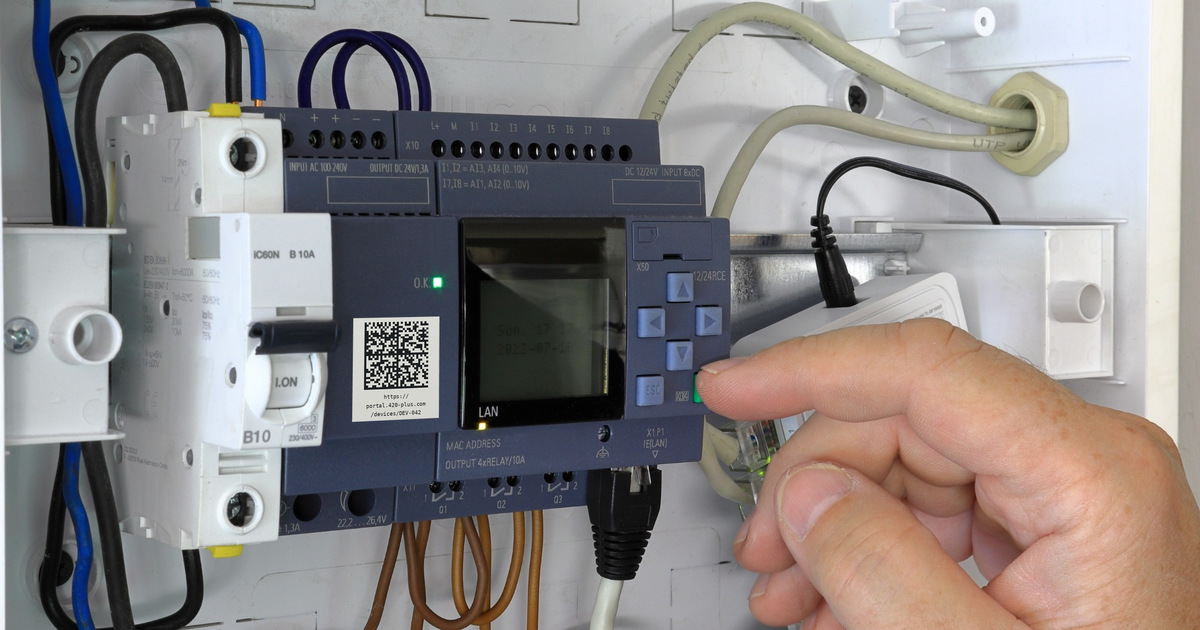
The device photograph shows the example address https://portal.420-plus.com/. The identifier DEV-042 in the path denotes an individual device in this example. An appropriately configured application can use it to provide the associated information. The application determines which information or work steps are available. The address is a fictional example.
The identity of an object and information about it can be managed separately. The GS1 resolver standard describes how a GS1 identity can be connected to information resources such as an instruction manual. Such a resolver is one possible architecture; even a GS1 Digital Link address does not have to point to a GS1-conformant resolver.[5][6]
For process architecture, a sequence of checks can be derived from this: first, the identifier is read and its data structure evaluated. The identified object or lot is then compared with the expected context. Only the business rule determines the action that follows and the result to be documented. This sequence of checks is an architectural inference, not a general GS1 requirement.[1][2]
At a workstation involving equipment, for example, the application could evaluate the individual-device identifier together with the order and the employee’s role before offering a work step. This is an architectural example, not an assured product function: retrieving an instruction and deciding whether a work step is permissible in the specific case remain separate tasks.
QR code or Data Matrix: Which fits the application?
Both are two-dimensional codes. However, a QR code is not a subtype of Data Matrix. Differences include the finder pattern and error correction. In practice, the data structure and readers supported by the application also matter.[2][4]
| Decision question | Data Matrix | QR code |
|---|---|---|
| How is the symbol recognised? | An L-shaped boundary with alternating modules on the opposite sides. | Finder patterns at three corners in the standard form considered here. |
| Should the default smartphone camera open a URL? | Support must be checked. According to the GS1 comparison, as of May 2025, not all default camera apps can automatically process Data Matrix. | According to that GS1 comparison, QR is the preferred option for direct web access using common smartphone camera apps. |
| Is scanning performed within an operational application? | The reader and application must support the code type and data content. | Here too, the reader and application must support the code type and data content. |
| How much space does the marking require? | Data volume, symbol shape, module size and quiet zone determine the space required. Do not reduce the size arbitrarily. | Here too, consider data volume, module size, quiet zone and reading conditions. There is no universal ranking by size. |
| What error correction is provided? | For ECC200, a fixed capacity for each symbol size. | Four selectable error-correction levels. |
| Which GS1 data structure is to be processed? | GS1 DataMatrix uses GS1 element strings; Data Matrix with GS1 Digital Link carries a URI. | QR code can carry GS1 Digital Link. This is distinct from GS1 QR Code with its own GS1 data structure. |
For an organisation, selection therefore starts with the application: What information needs to be read? What data structure does the target system expect? What marking can be applied to the object and read under the actual conditions? A blanket ranking of the two code types does not answer these questions.
Data Matrix code: Structure, size and readability
Data Matrix is a code type that represents data in a square or rectangular area. Unlike a linear barcode, its arrangement uses both dimensions. The ECC200 variant uses Reed-Solomon error correction, which can compensate for certain errors in the captured data.[2]
An L-shaped, continuously dark finder pattern helps the reader locate the symbol and determine its orientation. Light and dark modules alternate along the opposite sides. The encoded data area lies within this boundary. GS1 DataMatrix also requires a clear quiet zone one module wide on every side.[1][2]
Two aspects of size need to be distinguished: the number of modules and their physical size. How many modules are required depends on the data to be encoded and its encoding. In GS1 applications, the module size, also called the X-dimension, follows the requirements of the particular application. A universally applicable minimum size in millimetres would therefore be misleading.[1][2]
This has a practical consequence: additional data may require more modules. If these are squeezed into the same available area, the individual modules become smaller. Planning must therefore align the amount of data, the marking area, the production method and the reading conditions. The quiet zone forms part of the space required.[1][2]
Error correction does not guarantee recovery from arbitrary damage. The GS1 specification describes the correction capabilities for each symbol size in terms of codewords. This does not support a general assurance that a specified percentage of the visible code area may be missing.[2]
Reading codes and checking their quality
In scanning, GS1 distinguishes capturing the symbol from decoding the captured image. The resulting data is then passed to an information system for further processing. GS1 DataMatrix uses image-based readers or suitable camera systems.[1][2]
Symbol verification serves a different purpose: it assesses the quality of the symbol against defined criteria. A successful scan and a verification result therefore express different things. In their guidance on interpreting verification results, the GS1 General Specifications explicitly state that the correctness of the data content cannot be confirmed without additional software linked to a database. Such a connection alone does not guarantee correctness either.[2]
It is also necessary to check whether the human-readable text and code content agree. A fictional example: a label states batch CH-50, while the code contains CH-56. Checking symbol quality alone does not resolve this contradiction. An overall system can provide additional checks for this purpose; these must be distinguished from symbol verification.[2]
Even a symbol that was flawless when produced can be damaged later. A sample check does not automatically confirm the quality of every symbol in a production batch either. For operations, this means that marking and capture should be tested under actual conditions of use, including cases in which no usable content can be read.[2]
What GS1 DataMatrix and GS1 Digital Link add
GS1 DataMatrix combines the code type with a standardised data structure. Application Identifiers, or AIs, specify the meaning of the data that follows. AI 01 denotes the GTIN, AI 10 a batch or lot number, and AI 21 a serial number.[1][2]
The FNC1 control character in the first position indicates GS1 use. Certain consecutive data fields also require separators. The parentheses used around AIs in the human-readable text are not part of the encoded data. These rules help software interpret the fields correctly; they do not establish the authenticity of the marked object.[1][2]
GS1 DataMatrix and Data Matrix with GS1 Digital Link must also be distinguished. The former uses GS1 element strings. Digital Link represents identification data in a web-compatible URI structure that can be contained in either a Data Matrix or a QR code. The application must support the variant being processed.[4]
Not every web address is therefore a GS1 Digital Link. It must conform to the specified URI syntax containing GS1 identification data. Embedding an ordinary portal address without this structure in a Data Matrix code does not turn it into a GS1 Digital Link.[5]
When the assignment does not match
A fictional equipment example: two devices of the same design each carry a code with the same internal type identifier TYP-08. This level of distinction may be sufficient for general operating instructions. If a work step needs to be assigned to a particular device, however, the code content alone is insufficient: it does not distinguish between the two instances. The workflow therefore needs individual-device identification or an additional unambiguous assignment.
The following example uses only fictional internal identifiers, not GS1 keys. A work step expects material type MAT-17. MAT-19 is read. The code was decoded successfully, but the identified material does not match the requirement. For this example process, the rule is that the material assignment remains unresolved until the discrepancy has been clarified and the decision documented. This is a chosen process rule, not a function provided by the code.
A second case shows why the level of identification matters. Two containers of MAT-17 belong to batch CH-42. If their codes contain only this material and batch identifier, two identical scan results can mean either two containers or the same container being read twice. The code content alone cannot distinguish between them.
Even with a unique individual-object identifier, the process context remains decisive: the same container can legitimately be read first at goods receipt and later again during staging. A repeat at the same work step, by contrast, can trigger an unintended duplicate posting if every capture is treated as a new transaction without checking. The application therefore needs a rule that fits the action and the expected quantity; indiscriminately rejecting identical identifiers would be equally inadequate.
The EPCIS event model illustrates the separation of identification and context: among other things, it distinguishes individual objects from quantities at class level and adds information about time, location and business step. Here, eventTime denotes the time at which the event occurred according to the capturing application; recordTime concerns recording in the repository. These times are not evidence of physical execution obtained from the code itself either. EPCIS serves here as an example of separating the layers, not as a prerequisite for using Data Matrix.[3]
Before implementation, each capture point should have clear answers: what level is being identified, what information or action is needed, and what happens when a scan does not match or is repeated? The code content, reader and mapping in the system depend on these decisions. A general portal address can be an entry point. It delivers the right process context only in combination with the intended mapping and the business rules.
Primary sources and further reading
- GS1 DataMatrix Guideline, Release 2.5.1, January 2018
- GS1 General Specifications, Release 26.0, January 2026
- EPCIS Standard, Release 2.0, June 2022
- GS1 GO: What is the difference between the 2D barcode options (GS1 DataMatrix, Data Matrix with GS1 Digital Link and QR Code with GS1 Digital Link)? — updated 15 May 2025
- GS1 Digital Link Standard: URI Syntax, Release 1.7.0, August 2026
- GS1-Conformant Resolver Standard, Release 1.2.0, January 2026